
Choose an Email Campaign Type by the Reader's Next Task
Choose an email format by what the recipient needs to do: start a subscription, learn something, attend an event, use a product or evaluate an offer. The same template and metric will not suit every task. Define the audience relationship, purpose and next action before deciding how the campaign should look.
This guide covers subscriber and customer email. Examples are illustrative, and linked official guidance was reviewed on September 23, 2026.
Separate service messages from promotional campaigns
An order confirmation, password reset or appointment update exists to complete a requested service. A product offer or newsletter has a different purpose. Mixing a large promotion into an essential operational message can confuse the reader and affect how the message should be handled.
The FTC's CAN-SPAM guidance explains that the primary purpose matters when distinguishing commercial from transactional or relationship messages. Review the actual content and applicable requirements rather than assigning a convenient label in the email platform.
Keep operational messages focused. An appointment confirmation should make the time, location, preparation and change process easy to find. If there is a relevant optional resource, place it where it supports the appointment. Do not make the person read through unrelated offers to locate essential instructions.
For promotional messages, confirm the audience relationship and subscription expectations. A business enquiry, an event registration and a newsletter subscription are not identical choices. The opt-in guide explains how to preserve those distinctions when collecting and using contact details.
Use welcome emails to orient the subscriber
A welcome email confirms the relationship and helps the subscriber complete the task that brought them in. Deliver the promised resource, identify the sender and explain what future messages will cover. Keep the first action prominent rather than turning the message into a full company presentation.
For a fictional commercial-design newsletter, the welcome message might provide a project-brief template and explain that future issues cover planning decisions. A short instruction about using the template is more valuable than a generic paragraph about being excited to connect.
If preferences affect future content, offer a small number of meaningful choices. A reader might choose workplace planning or hospitality projects. Include a general option and avoid asking for information the team cannot use. The dynamic-content guide covers how those choices can inform later messages.
Measure whether the welcome journey works. Check successful delivery of the resource, preference completion where relevant and substantive replies. An open event alone does not tell you whether the subscriber received what they requested. Test the links and the unsubscribe path before connecting the message to a public form.
Choose newsletters and educational sequences for different reading habits
A newsletter is a recurring editorial package. Readers recognize its subject and return when the material is useful. It can contain several items, but the selection should make sense for the audience. A collection of unrelated sales announcements is difficult to describe with a credible subscription promise.
An educational sequence follows a specific task over several messages. A buyer-preparation series might move from defining requirements to comparing options and planning implementation. It needs a coherent progression and a natural end, rather than an indefinite stream of reminders to book a call.
Write each message so it can be understood if an earlier one was missed. Brief context and a link to the relevant resource help. Do not withhold essential information merely to make the reader wait for the next installment. The sequence should respect the pace at which people choose to engage.
The inbound email strategy guide explains how these formats connect to a larger content journey. Use a newsletter for continuing useful updates and a sequence for a defined learning task; they can coexist when the audience understands both choices.
Make event invitations and reminders practical
An invitation should help the reader decide whether the event is relevant and feasible. State the topic, intended audience, date, timezone, format and expected commitment. Explain what attendees will do or learn, using claims the organizer can support.
After registration, switch to the information needed to attend. Confirmation, joining instructions and an appropriate reminder serve the attendee's request. Avoid repeatedly asking them to register after they have already done so. Keep registration status synchronized with promotional audience selection.
For a completed event, send the promised materials and a relevant next step. A recording or worksheet should be accessible to the intended audience. If the attendee asks a question, route it to someone who can answer rather than leaving the response inside a reporting system.
Measure registrations, attendance and the outcome the event was designed to support. If an illustrative event has 80 registrations and 52 attendees, attendance is 65%. That does not establish sales opportunity. Track appropriate follow-up requests separately and retain the observation window.
Distinguish product education from product promotion
Product education helps an existing user complete a task. A feature announcement should explain who benefits, what changed and how to use it. Include any eligibility or setup conditions that affect the reader's next action. Avoid sending instructions for a feature the recipient cannot access without making that limitation clear.
Product promotion asks someone to consider an offer. Explain the use case, scope and material conditions, then provide a relevant destination. A discount is not a substitute for an understandable offer. The buyer still needs to know whether the product fits their situation.
Use known customer information carefully. Confirmed product ownership can support relevant instructions. A single click on a product page should not become a confident statement that the person is shopping for an upgrade. The personalization guide helps separate reliable facts from weaker inferences.
For repeat purchases or renewals, keep timing grounded in the actual relationship. A reminder can be helpful when it reflects a known renewal date or requested schedule. Avoid presenting an invented deadline as an account requirement merely to increase urgency.
Select the format with a decision table
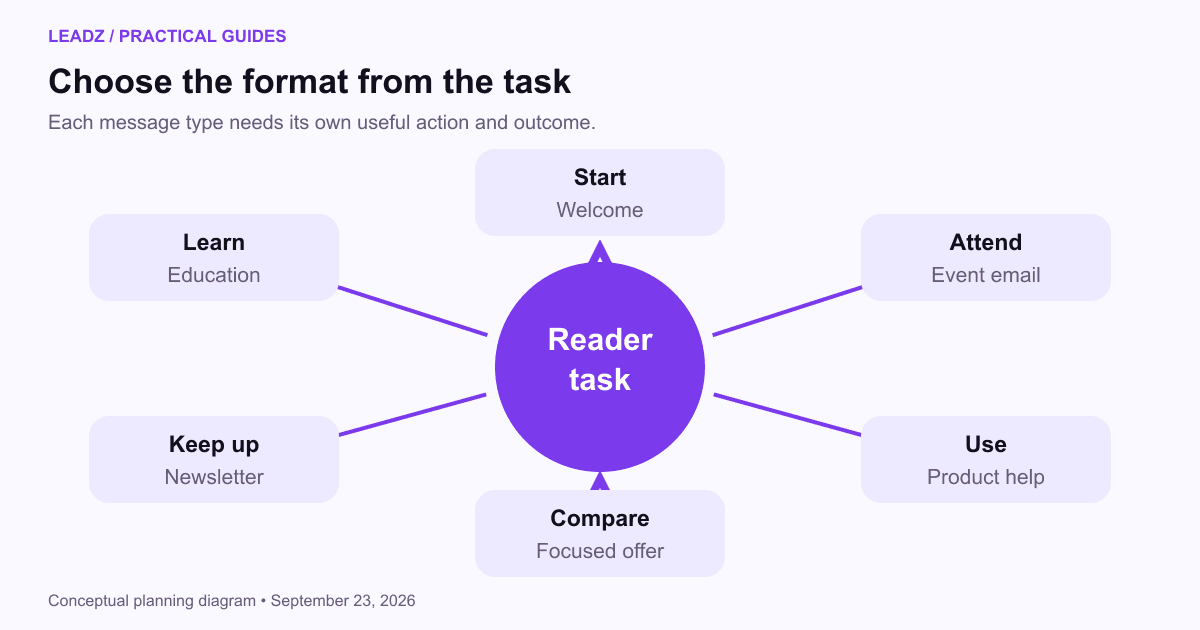
Use the recipient's task as the first choice. Then decide the message length, action and measure. The following table is a planning tool, not a rule that every business needs all six campaign types.
Reader's task | Suitable format | Primary result to inspect |
|---|---|---|
Start the requested relationship | Welcome or resource-delivery email | Promised resource accessed and expectations clear |
Understand a problem over time | Educational sequence | Useful progress or a substantive question |
Keep up with a topic | Newsletter | Relevant reading and continuing interest |
Attend an event | Invitation and attendee reminders | Registration and attendance |
Use a product or service | Product education | Completion of the intended task |
Evaluate an offer | Focused promotional email | Appropriate enquiry or purchase action |
Re-engagement needs particular care. If someone has stopped interacting, first check whether tracking is meaningful and whether the subscription promise remains relevant. A clear preference invitation may help, but repeated pressure is unlikely to repair an unwanted relationship. Follow your platform's handling of inactive or suppressed contacts.
Choose a safe default when the audience state is unknown. Research the record or ask for an appropriate preference rather than sending every campaign type. The cost of an irrelevant message includes confusion for the recipient and extra work for the team handling replies.
Measure each format against its purpose
Keep underlying counts with every rate. A welcome email's resource access, an event's attendance and an offer's completed purchases describe different actions. Comparing them under one label such as “conversion rate” obscures the decision the report should support.
Use a fixed reporting window and consistent definitions. The email metrics guide shows how accepted messages, distinct recipients and business outcomes relate. A person receiving several messages in a sequence should not be counted as several new audience members.
When testing a change, keep the campaign's job constant. Comparing a newsletter with a focused offer cannot isolate the effect of a button or subject line. The A/B testing guide explains how to choose a specific question and interpret small differences without overstating them.
Review replies and support requests alongside numerical results. Repeated questions about the event timezone or product eligibility can reveal missing content even when click rates look healthy. Fix the information that prevents the reader from completing the task.
Build only the formats you can maintain
For example, a workshop provider could begin with a subscriber welcome, a focused invitation, an attendee confirmation and a materials email after the event. Each has a different entry condition. A subscriber receives the invitation; a registrant receives attendance instructions; an attendee or eligible registrant receives the promised materials according to the event terms. Writing those conditions down prevents the same person from receiving contradictory prompts.
Keep a fallback for exceptions. If the event is canceled, pause the scheduled reminders and send a clear operational update to affected people. If the resource is delayed, explain the revised delivery plan. The campaign inventory should make these connected messages visible so changing one event does not leave an old automation running in the background.
Inventory the audience relationships you actually have. A small service business may need a welcome message, occasional useful updates and clear appointment communications. It does not need every automation shown in a software demonstration. Add a format when it solves a recurring task that the current program leaves unsupported.
Give each active campaign an owner, entry rule and stopping condition. A new purchase, canceled event or unsubscribe may change which messages are appropriate. Review those transitions whenever systems or services change, since old automations can continue operating quietly.
Keep reusable templates simple. Maintain consistent identity and accessible structure while allowing the content to fit the purpose. A short service update should not be forced into a large promotional layout simply because that is the only template available.
Before releasing a new format, apply the email pre-send review to the audience, copy, links and response process. The format determines the job; those checks establish whether the actual message is ready to do it.
Choose the next email by finishing this sentence: the recipient needs help to do this specific thing. If the answer is unclear, improve the purpose before writing the subject line. A useful campaign format follows from the task, the relationship and a next step the reader can understand.