
Dynamic Email Content: Write the Rules Before the Email
Dynamic email content changes part of a message according to information about the recipient. A subscriber who selected commercial landscaping might see a maintenance-planning article, while one interested in residential work sees a seasonal-care guide. The useful work is defining those choices, checking the data and providing a sensible version when information is missing.
This guide covers conditional content for an existing subscriber audience. Product documentation was reviewed on September 23, 2026; examples describe a proposed workflow, not measured campaign results.
Choose a difference that matters to the reader
Start with the reason for varying the content. A different first name rarely changes whether an article is useful. A different service interest, product already owned or region where an event takes place can change the reader's next decision. Choose a variation you can explain without referring to the email software.
For an equipment distributor, existing customers may need maintenance instructions while prospective customers need a comparison guide. Sending both blocks to everyone may make a short message unnecessarily long. Conditional blocks can keep the relevant task prominent, provided the customer status is accurate and the message still makes sense as a whole.
Use a small number of meaningful variants first. Every additional branch creates content to write, links to check and combinations to preview. A team that can maintain two useful versions reliably is better served than one that creates twenty fragile variations based on incomplete records.
Write down the expected benefit. “Subscribers can find their selected topic without scanning unrelated offers” is a clear design objective. “Personalization increases engagement” is too vague to tell you what to build. The personalized marketing guide helps decide which differences deserve a tailored experience.
Define the data and its fallback
Prefer information the subscriber intentionally supplied or that reflects a confirmed relationship. A selected topic, purchased product or stated service region can support a content rule. An inferred interest from one ambiguous click is weaker evidence. Record how the field was populated and when it may need refreshing.
Decide what each value means. A field called “location” could represent billing address, service address, branch headquarters or a past event venue. Those are not interchangeable. An invitation to a local workshop should use information relevant to attendance, not whichever location field happens to be available.
Treat missing values as a normal case. A default block can invite the reader to choose a topic or offer a broadly useful article. Avoid displaying a blank space where the primary action belongs. If a critical instruction varies by a field you cannot trust, send separate carefully reviewed messages or collect the needed information first.
Keep sensitive assumptions out of ordinary marketing rules. You rarely need to infer a person's health, finances or family circumstances to select a business tutorial. Use information proportionate to the task and explain preference choices plainly. Good personalization should feel understandable if the recipient asks why they received that version.
Make the decision table explicit
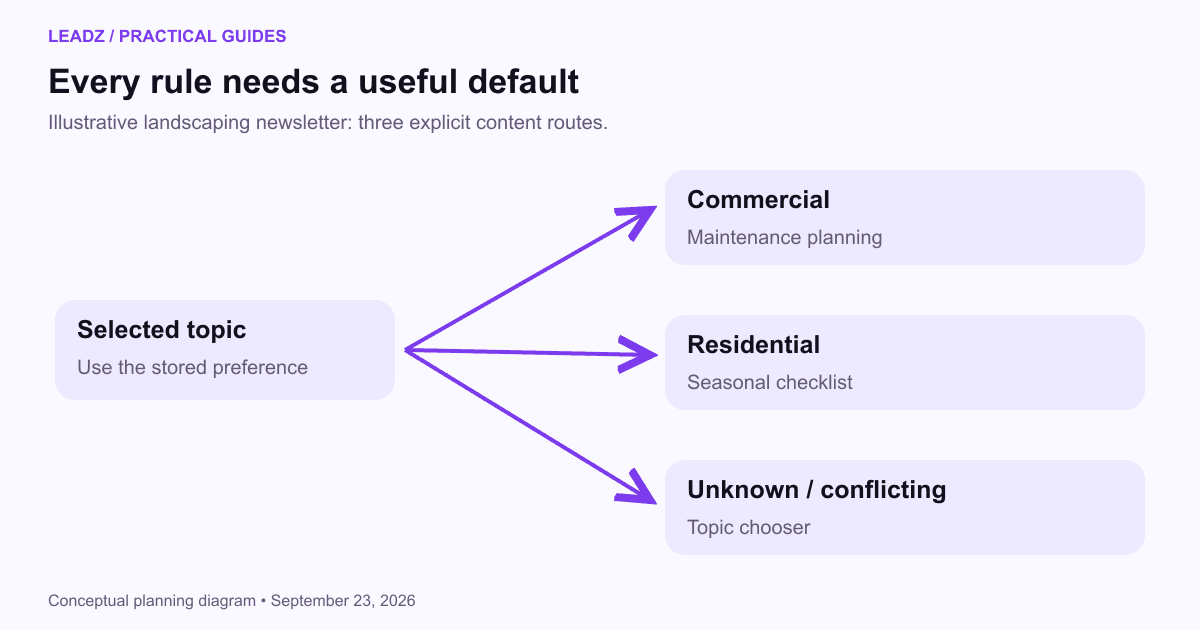
Consider a hypothetical landscaping newsletter with three states: commercial interest, residential interest and unknown preference. Write the rules before designing the blocks. The table becomes the reference for authors, operators and reviewers, so everyone checks the same intended behavior.
Stored preference | Main block | Call to action |
|---|---|---|
Commercial | Planning maintenance around site use | Read the commercial planning guide |
Residential | Preparing a garden for seasonal work | Read the seasonal checklist |
Unknown or conflicting | Short explanation of available topics | Choose your preferred topic |
Specify what happens when several rules match. A subscriber could be both a customer and interested in commercial work. You might show the commercial educational block and suppress the introductory sales offer for customers. That is a priority rule, and it should be written down rather than left to the order of blocks in the editor.
Keep essential information outside optional branches. Sender identity, preference controls and the message's basic purpose should remain available to every recipient. If an event is canceled, all affected attendees need the operational update regardless of a promotional segmentation rule.
Use separate messages when the variants have fundamentally different jobs. A renewal notice and a prospect introduction may share branding but require different context, timing and handling. Dynamic content is most useful when the overall message is coherent and a limited portion benefits from variation.
Implement and preview every branch
Mailchimp's dynamic-content documentation describes showing or hiding blocks using audience conditions. It also notes that ordinary test emails do not activate dynamic-content merge tags; live-data preview or a controlled test segment is needed. Check your own platform's behavior rather than assuming its test button proves every branch.
Create representative test records. Include one for each expected value, one with no value and one with conflicting or stale information. Give the records harmless test addresses and mark them clearly so they cannot be mistaken for customer data. Use them to check content, layout and links together.
Look at the complete message for each record. A subject line written for customers may be wrong for prospects even if the body block is correct. A pronoun or transition can refer to content that is hidden in one version. Reading the email end to end catches these problems more effectively than inspecting individual blocks.
Check the destination as well. The commercial block should lead to the commercial guide, and a preference link should update the field used by the next send. If a button takes every recipient to the same generic page, the carefully varied email may not help them complete the task.
Keep content dependencies visible
A useful release note could say: “This campaign uses the selected-topic field. Commercial and residential values show their matching guide; empty or conflicting values show the topic chooser. Customer status suppresses the introductory offer but does not hide the guide.” The note describes enough behavior for another operator to check the campaign without inspecting every setting from scratch.
Also record the safe replacement. If the preference integration stops updating, the team could use one general message linking to the topic chooser. Prepare that version before it is needed. A fallback that preserves the reader's task is more useful than trying to repair several untested conditions minutes before a scheduled send.
Record which fields drive which messages. If an administrator renames a preference or changes a customer-status integration, someone needs to know which campaigns may be affected. A simple register with field name, allowed values, owner and dependent messages can prevent a small data change from breaking several automations.
Give recurring content an owner and a review trigger. Product instructions should be checked when the product changes. Event blocks need a removal date. Seasonal advice needs review before reuse. Copying last year's campaign can preserve old conditions and hidden blocks that are easy to miss in a visual editor.
Keep a record of the rendered variants sent in important campaigns. A complaint about an irrelevant offer is easier to investigate when the team can identify the rule and content version involved. Do not rely on today's contact record to reconstruct yesterday's message after fields have changed.
When someone corrects a preference, use the correction. Avoid letting an inferred-interest process immediately overwrite a deliberate selection. The opt-in guide discusses how preferences and subscription status should remain understandable to the person who supplied them.
Measure whether the variation helped
Compare outcomes that match the purpose. If the goal is helping subscribers find a relevant tutorial, count visits to that tutorial and any meaningful next action. If the goal is event attendance, registrations and attendance matter more than which block attracted the most clicks.
Do not compare commercial and residential subscribers as though their different results prove that one block is better. The audiences differ. To investigate the effect of tailoring, you could compare tailored and standard versions within a comparable audience, using a planned test and a fixed observation window. The email A/B testing guide explains that distinction.
For an illustrative operational check, suppose 500 subscribers should receive the commercial block, 300 the residential block and 200 the default. Those groups total 1,000. If your preview or segment counts sum to 1,080, investigate overlap before sending. If they sum to 920, identify which records match no route.
After sending, inspect a sample of outcomes in each branch. A low response from the default group may be expected because the preference is unknown. A sudden absence of clicks in a previously active branch may indicate a broken link or rule. Use the campaign measurement framework to keep technical failures separate from audience response.
Start with a rule the team can maintain
Choose one recurring message and one reader-relevant field. Draft the variants, write the fallback and ask a colleague to explain the rule back to you. If the explanation requires several exceptions, simplify the first version. Complexity can be added later when it solves an observed problem.
Run a controlled review before the full audience receives it. Confirm that every test record gets a complete message, the links work and preference changes persist. Document how to disable the variation and use a safe general version if the source data fails near the send time.
After the first campaign, review questions and corrections as well as clicks. A recipient saying “I no longer handle residential work” gives you a data-maintenance task. Repeated confusion about why a block appeared may suggest that the preference labels need to be clearer.
Keep the system modest enough to inspect. Dynamic content earns its place when it removes irrelevant material or helps a reader act on a known need. A reliable choice between a few useful versions can accomplish that without turning every email into a complicated collection of assumptions.