
Email Marketing Dos and Don'ts: A Practical Pre-Send Review
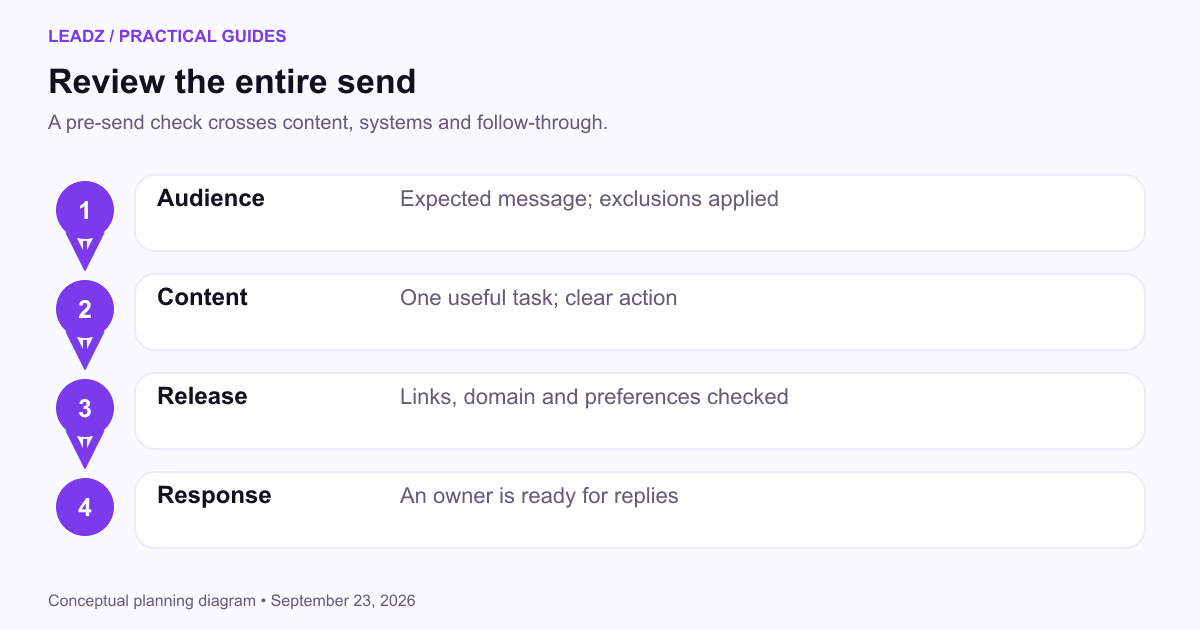
Before sending a marketing email, check that the audience expects the message, the content fulfills a clear purpose and someone can handle the response. Then review the links, sending setup and exclusions. Most avoidable mistakes happen when those decisions are spread across tools and nobody checks the complete campaign.
This guide focuses on subscriber and customer marketing. Prospecting has a different starting relationship; use the cold outreach guide when that is the task. Official guidance was reviewed on September 23, 2026.
Start with the audience relationship
Know how people entered the audience and what they were told. A newsletter signup, a request for a quotation and a purchase are different events. They do not automatically express the same preference for promotional email. Retain the source, date and wording of the invitation so your team can understand the relationship later.
Do send the kind of content the subscriber requested. If a form promises monthly workshop announcements, make that the core of the program. A change to daily product promotions deserves a fresh decision about expectations and permission. The opt-in email guide explains how to make the initial choice clear.
Do not add business directory contacts to a subscriber newsletter simply because their addresses are available. A public business email can support contact research, but it is not a subscription record. Keep research lists separate from opted-in audiences, and respect your sending platform's rules about imported contacts.
Check exclusions at the point of sending. A contact who unsubscribed in one tool may still appear in a sales export or an old spreadsheet. Decide how suppressions travel between systems and who resolves conflicts. An import should never silently restore a person who has already asked to leave the audience.
Give the message one useful job
Choose what the reader should understand or do after reading. A product-update email might help an existing customer use a new feature. An event invitation should help them decide whether the session is relevant and whether they can attend. A newsletter can contain several items, but it still needs a recognizable editorial purpose.
Write the subject line after the purpose is clear. Use the language of the actual topic, and make the preview text add information. Avoid implying a personal reply, urgent account problem or final deadline when none exists. A misleading opening can generate attention while damaging the trust needed for later messages.
Do make the main action easy to find. Describe it in concrete terms such as “View the workshop agenda” or “Choose your session.” A button labeled “Submit” tells the reader little about what happens next. Place the key details near the action so readers do not need to reconstruct the offer from several paragraphs.
Do not squeeze unrelated promotions into a message that exists to fulfill a request. If someone asked for a guide, deliver the guide clearly. Additional material should support that task. The email campaign types guide helps distinguish useful service messages from broader promotional campaigns.
Review the email as a reader will see it
Check the message on a narrow screen and with images unavailable. The essential meaning should remain understandable in text. Descriptive alternative text can explain an informative image, but a paragraph embedded inside a graphic is a difficult reading experience when the image does not load or the user relies on assistive technology.
Use headings and short paragraphs to make the message scannable. Keep links descriptive and avoid depending on color alone to distinguish an action. Check text contrast and button size in the actual template. A design that looks comfortable on a large desktop preview can feel cramped in a mobile inbox.
Test every destination, including preference links, calendar links and downloads. Confirm that the landing page matches the email's promise and works for someone who is not signed into your own account. Previewing while authenticated can conceal a permission problem that subscribers will encounter.
Review personalization with realistic missing data. A first-name greeting needs a sensible fallback. Conditional content needs a version for recipients whose preferences are unknown. The dynamic content guide shows how to test those branches before they become visible errors.
Treat sending setup and unsubscribe handling as part of the campaign
Give the person responsible for email operations time to check the sending domain, authentication and platform settings. These checks affect whether the message can be evaluated by receiving systems. A designer or copywriter should not have to guess whether a domain change or new sender address has been configured correctly.
Google's sender requirements include authentication and additional obligations for bulk senders to personal Gmail accounts. Review the current requirements for your setup rather than treating a previous successful campaign as permanent proof that everything is configured correctly.
The FTC's commercial-email guidance requires accurate identification and an effective opt-out process. Use the official guidance when checking your obligations; other jurisdictions and platform policies can impose additional requirements. Assign responsibility for handling requests that arrive as replies as well as through the unsubscribe link.
Do not make a recipient log in or explain themselves to stop promotional messages. A preference center can offer useful choices, but the route to leave should remain clear. Check what the system actually records after a test unsubscribe, then confirm that the excluded address stays out of the next audience export.
Measure the action the email was meant to support
Select the main outcome before sending. For a workshop invitation, registration by an appropriate attendee is more informative than an open. For a product tutorial, a useful next step might be visiting the instructions or completing the described task. Keep a business outcome alongside the platform's activity measures.
Apple's Mail Privacy Protection documentation explains why senders cannot reliably infer whether affected recipients opened a message. Use opens cautiously, especially when deciding whether an individual is interested. An automated image event is not a conversation.
Consider an illustrative invitation sent to 800 subscribers, with 760 messages accepted, 38 distinct clickers and 19 registrations. The accepted-message click rate is 38 divided by 760, or 5%. Registrations are 2.5% of accepted messages. Calling either number simply “conversion” hides the action and denominator.
Check attendance later if that was the commercial purpose. A registration can be useful without becoming attendance, and attendance does not automatically become a sales opportunity. The email metrics guide explains how to preserve those distinctions and calculate combined results from counts.
Change the campaign deliberately
When a campaign underperforms, examine the earliest weak step. Were messages accepted? Did appropriate readers click? Did the landing page explain the offer? Did the form fail on mobile? Changing the subject line cannot repair a broken booking page, and sending more frequently cannot make an irrelevant offer useful.
Use an A/B test when you have a specific question and enough comparable recipients to learn from it. Keep the main difference clear and decide how long the observation period will run. The email testing guide covers test design and why a small numerical lead does not always justify declaring a winner.
Do not change the success metric after seeing the results. If the purpose was registrations, a version with more clicks but fewer registrations needs investigation. It may have attracted curiosity without clarifying the event. Record the result against the original goal before deciding whether another metric adds context.
Keep frequency decisions connected to subscriber expectations and the amount of useful material you can provide. A weekly schedule is only sensible if the team can sustain it and readers understand it. When the content is occasional, a truthful occasional promise is easier to maintain than an ambitious cadence that quickly becomes filler.
Use a short release checklist with named owners
Keep a pause procedure beside the send checklist. If a product becomes unavailable, an event moves or a link fails after scheduling, the operator needs to know which campaign to stop and who can approve corrected copy. Check whether queued messages, reminders and follow-up automations must be paused separately. Stopping the initial send may not cancel everything connected to it.
For a correction, explain the exact change and the action affected. If the workshop time was wrong, put the corrected time and timezone near the start. Do not make recipients compare two long emails to discover what changed. Save both versions internally so colleagues answering replies understand the sequence.
Before sending, have one person confirm the audience and exclusions, another review the content and destinations if the team size permits, and the operator check the sending setup. In a small business one person may perform all three roles, but separate passes make different kinds of mistakes easier to notice.
Record the final version, intended audience, scheduled time and response owner. Save the source of any numbers or product claims that may change. If a price, date or feature description is uncertain, resolve it before scheduling rather than leaving the recipient to discover the error.
After sending, inspect early operational issues without rushing to judge the whole campaign. Broken links and unexpected failures need attention quickly. The full response outcome needs the observation window you planned. Keep corrections factual, and avoid sending a second message unless it meaningfully helps recipients who were affected.
Finish the review with one documented lesson and an action. “Mobile visitors abandoned the event form at the company-size field; remove it unless operations needs it” gives the next campaign a useful improvement. A long list of generic best practices is less valuable than fixing the specific point where this audience struggled.