
Opt-In Email Marketing: Write a Clear Invitation and Keep the Promise
An effective opt-in invitation tells people who will email them, what the messages contain and what they are choosing. The content after signup should fulfill that promise and make preferences easy to change. Clear wording is only half the work; the form, confirmation and subscription record must preserve the same choice.
This guide covers a subscriber program, not purchased prospecting contacts. Examples are draft language to adapt, and official guidance was reviewed on September 23, 2026.
Define what the subscriber is joining
Name the topic and purpose before writing the form. A commercial-landscaping business could offer monthly maintenance planning notes for facilities teams. A design studio might send occasional project-preparation guides. Those promises are easier to understand and sustain than an undefined invitation to receive news and special offers.
Choose a frequency the team can maintain. If the content is occasional, say so. Do not promise a weekly guide when the only planned message is a sales announcement. Frequency is part of the expectation people use when deciding whether the relationship is worth their attention.
Explain who the program is for. A resource for facilities managers should say what workplace task it helps complete. That lets residential readers recognize that it may not fit them. Clear audience language improves self-selection without requiring a long form or a list of job-title questions.
Keep a resource request distinct from a continuing subscription where they serve different purposes. Someone can want a single checklist without wanting ongoing promotions. The inbound email basics guide shows how delivery and follow-up can be organized around that choice.
Write form copy that a person can evaluate quickly
Use a concrete benefit tied to the actual material. For the illustrative landscaping program: “Get monthly notes on planning commercial grounds maintenance, including seasonal scheduling and site-access checklists.” It describes the subject and cadence without promising unsupported savings or results.
Label the action clearly. “Subscribe to maintenance notes” is more informative than “Submit.” If the form also delivers a download, explain which action the button completes and whether a separate choice controls future emails. Avoid hiding the subscription decision in unrelated terms or ambiguous wording.
Ask only for information needed to operate the program. Email address and a relevant topic choice may be sufficient. If you request a company name or region, explain how it will help. Extra fields create effort for subscribers and information that the business must protect and maintain.
Provide a concise privacy explanation with access to the full policy. The exact legal requirements depend on the audience and jurisdiction, so have the implementation reviewed appropriately. Marketing copy should accurately describe the actual data use rather than promise that information will never be shared when service providers process it.
Choose and test the confirmation flow
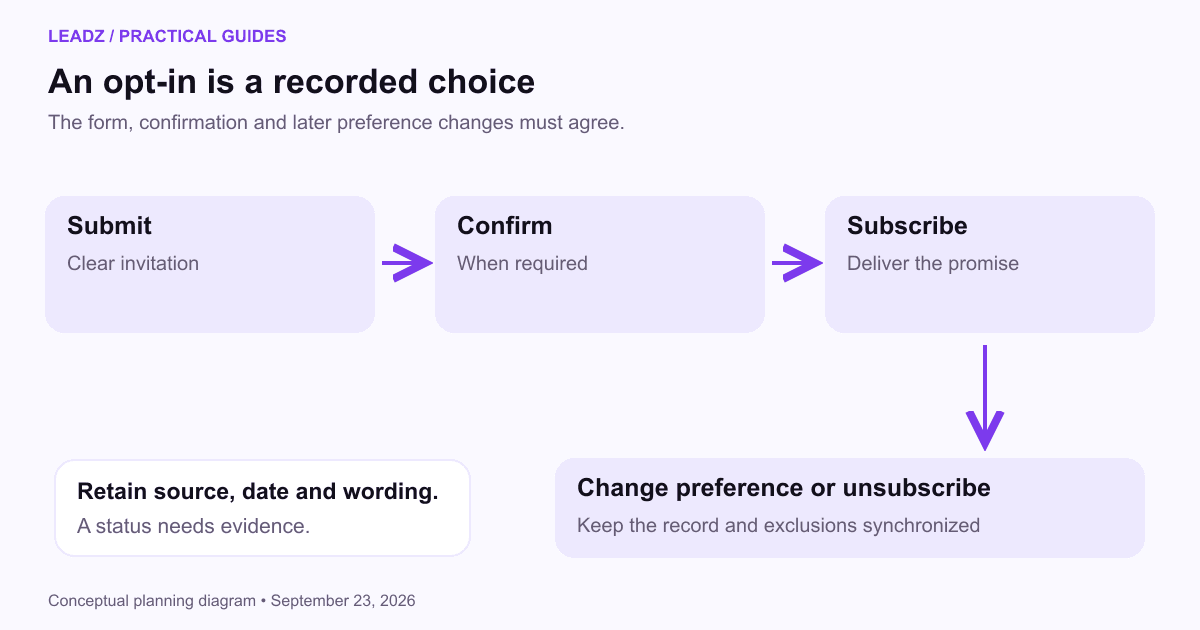
Mailchimp's single- and double-opt-in documentation distinguishes immediate addition after submission from a second confirmation click. Double opt-in can help establish that the address holder completed the confirmation step. It does not prove that every future message will be relevant or that all legal requirements are automatically satisfied.
Make the confirmation page explain what happened. If confirmation is required, tell the reader to look for the email and identify the sender. If the subscription is already active, explain when the first promised message will arrive. Avoid a generic “success” state that leaves the reader uncertain.
Keep the confirmation email focused on the requested action. Explain why it arrived, what the button does and what to do if the person did not request the subscription. Test the link's expiry and repeated-click behavior in your platform so support can handle ordinary questions accurately.
Check accessibility and mobile use. Labels should remain visible, errors should identify the field that needs attention and buttons should describe their action. A visitor using a keyboard or assistive technology should be able to complete the same choice without guessing which control matters.
Deliver a welcome message that earns the next email
The welcome message should identify the sender, deliver any promised resource and remind the subscriber what to expect. Keep the main task easy to find. If someone requested a checklist, place the checklist link before an extended introduction to the business.
Use the first message to help the reader start. A short instruction such as “Begin with the site-access section before planning the maintenance calendar” can make the resource more usable. Only include that instruction if it matches the actual document. A welcome email should not be a substitute for a resource that lacks its own explanation.
Offer a relevant preference choice when it changes future content. The landscaping program might distinguish facilities scheduling from planting care. Do not present a long preference survey unless the team can use and maintain the answers. The dynamic content guide explains how preferences can support a small number of useful versions.
Let subscribers reply to a monitored address when you invite questions. If the program uses a no-reply sender, provide a real support or contact route. A welcoming tone is unhelpful if the person who responds discovers that nobody receives the message.
Keep subscription evidence and preferences dependable
Store the signup source, date, status and the wording or form version used. When the invitation changes materially, keep a way to distinguish earlier subscribers. This lets the team understand what people chose rather than assuming everyone agreed to the current version.
Keep pending confirmation, active subscription, unsubscribe and invalid-address states separate. A person who has not confirmed is different from someone who deliberately left. Those states affect which messages should be sent and what support should do when the person asks a question.
Test imports and integrations against exclusions. A CRM export or event attendance list should not reactivate unsubscribed contacts automatically. Decide which system governs subscription status, how updates move and who investigates conflicts. This is a practical maintenance task, not something a checkbox alone can guarantee.
The FTC's CAN-SPAM guidance covers commercial-message identification and opt-out obligations. An opt-in program still needs to handle those obligations, along with any stricter applicable rules and platform requirements. Keep the unsubscribe process easy to find and test it as part of campaign review.
Evaluate the quality of the signup journey
Measure each step using a defined period. Form views, submissions, confirmations and active subscribers are different counts. If one person submits repeatedly, submissions can exceed distinct people. Preserve enough information to diagnose the journey without reporting duplicates as audience growth.
Suppose an illustrative form has 500 visits, 100 submissions and 80 confirmed subscriptions. Submission share is 20% of visits; confirmation share is 80% of submissions. Confirmed subscriptions are 16% of visits. Each calculation identifies a different transition, so name the denominator in the report.
Investigate the reason for a weak step. Low submissions may reflect an unclear promise or an audience mismatch. Low confirmation may involve delivery, confusing instructions or invalid entries. Do not assume the solution is removing confirmation without understanding the issue and the requirements of the program.
Review the first messages as well as the form. Early unsubscribes or replies saying “I only wanted the checklist” may reveal a mismatch between the invitation and follow-up. The email metrics guide helps connect audience changes with engagement and meaningful outcomes.
Improve the invitation without making it misleading
Compare two draft invitations by asking someone unfamiliar with the program to explain what they would receive. If they expect a personal consultation but the form actually starts a newsletter, revise the wording. If they cannot tell whether a download also signs them up for promotions, separate the choices. This simple comprehension review can reveal problems before a numerical form test produces misleading growth figures.
Check the error states as carefully as the success state. An existing subscriber who submits again should receive a clear response without being enrolled twice. An invalid address should produce a helpful correction message. A temporary system failure should not claim that the subscription succeeded. Tell the reader what they can do next and give support enough information to investigate without exposing personal details in public error text.
Test a clearer explanation of the content before adding urgency or stronger promises. A sample issue or a short preview can help people decide whether the program is useful. It also gives writers a concrete standard for what future messages should deliver.
If you change the program's topic or frequency, decide how existing subscribers will be informed and what choice they need. Do not rely on a broad phrase in an old form to justify an unrelated new campaign. The relationship is easier to maintain when the reason for each message remains recognizable.
Review active forms periodically. Old landing pages, event pages and embedded forms may continue adding people after the main website has changed. Check that they use the current promise and send records to the intended audience with the right status.
Start with one truthful invitation, one working confirmation path and one useful welcome email. Follow it yourself from signup to unsubscribe, then ask someone unfamiliar with the setup to try. The most effective opt-in copy is supported by a process that does exactly what the words promise.