
Inbound Email Marketing: Build a Useful First Subscriber Journey
Inbound email marketing continues a relationship someone has chosen to start. A reader subscribes to useful updates, requests a resource or asks to hear about a service, and the next messages help them with that task. Begin with a clear invitation and a small, dependable sequence before building complex automation.
This beginner's guide follows an illustrative commercial-cleaning company offering a workplace cleaning checklist. It explains the basic setup; the separate inbound strategy guide covers coordination across content and sales. Sources were reviewed on September 23, 2026.
Understand what makes the relationship inbound
The starting action comes from the reader. They find a page, attend a session or receive a recommendation, then choose an email relationship with a defined purpose. Your job is to honor that choice. A list of businesses that might need cleaning services is useful for research, but it is not an inbound subscriber audience.
Separate a request from an ongoing subscription. Someone may want one downloadable checklist without wanting regular promotions. Make the choices explicit in the form and retain the wording they saw. If you plan to send a short educational sequence, say what it covers rather than relying on a vague statement about updates.
A useful inbound message solves a small problem even when the recipient is not ready to buy. The cleaning checklist might explain how to inventory shared areas or prepare access instructions. A later message can discuss when a professional assessment is useful. The sequence should help the reader make a decision, including deciding that the service is not appropriate.
Avoid treating every interaction as a signal of sales readiness. Downloading a document can reflect curiosity, research for someone else or a need unrelated to your offer. Keep those possibilities open until the person provides more information. The qualification guide shows how to separate content engagement from a confirmed business need.
Write an invitation that sets expectations
Describe the resource in terms of the work it helps complete. “A room-by-room checklist for planning office cleaning” is clearer than “Get exclusive insights.” Explain who it is for, how it arrives and whether any follow-up is included. The visitor should be able to decide without guessing what access will cost in attention.
Ask for the smallest amount of information needed. An email address may be enough to deliver the resource. If you ask for workplace type, explain that it helps select relevant examples. Leave unnecessary fields out rather than collecting information that nobody uses or maintains.
Keep the ongoing-email choice distinct from the download when the two serve different purposes. A checkbox label can name the sender, topic and expected frequency. Avoid preselecting a choice in a way that makes the person's intention unclear. The opt-in content guide includes practical wording and recordkeeping considerations.
Show what happens after submission. A confirmation page can explain whether the email has been sent or whether the visitor must confirm their subscription first. Provide a usable route if the message does not arrive. A blank success state leaves people submitting repeatedly and creates duplicate records for the team to resolve.
Choose confirmation and delivery behavior
Mailchimp's opt-in documentation distinguishes immediate subscription after form submission from a second confirmation step. Choose the method that fits your requirements and operational needs, then test the whole journey. Do not assume that changing a platform setting updates the wording on every form.
When confirmation is required, keep the confirmation message focused on completing that request. Tell the reader why it arrived and what the button does. A person who never confirms should remain distinguishable from someone who joined and later unsubscribed. Those states call for different handling.
Deliver the promised resource reliably. Test the download without being signed into your own account and check it on a phone. Use a stable file destination and a descriptive filename. If the resource is a checklist, include enough instructions that someone opening it weeks later can understand how to use it.
Keep the initial email short. Identify the sender, provide the resource and explain the next relevant step. A long sales pitch before the download link delays the task the person came to complete. If there will be follow-up, remind them of the topic and give them a clear way to change their preference.
Build a short sequence around practical questions
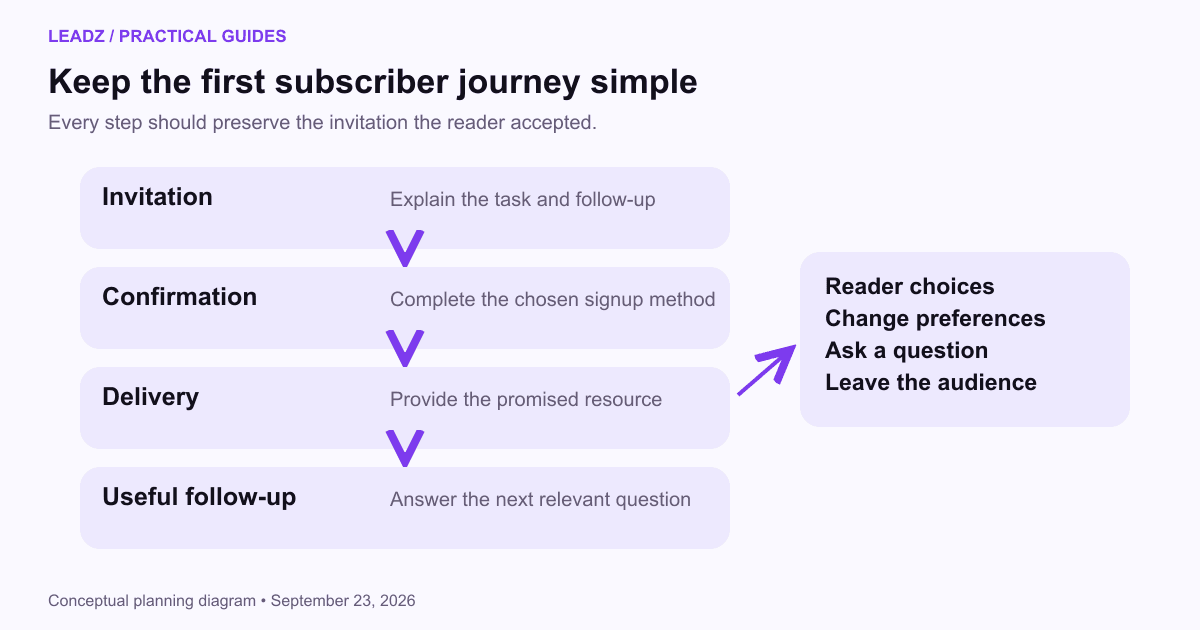
For the illustrative cleaning checklist, the first follow-up could explain how to prioritize high-use areas. The next could help the reader compare in-house work with a contracted service. A final optional invitation could offer a scope discussion for readers who want one. Each message advances the same task rather than introducing unrelated offers.
Write the sequence before configuring automation. Check whether each message has a useful reason to exist. If two messages repeat the same benefit, combine them. If a message depends on information you do not have, revise the content or ask the reader directly instead of pretending to personalize it.
Allow human responses to change the path. If someone asks for a quotation, a person should handle the request and stop irrelevant educational reminders. If the reader says the material is for a home rather than an office, the business may need to clarify its scope. Automation should preserve these decisions rather than continue as if nothing happened.
Set a natural ending. The sequence can conclude with a useful summary and an invitation to remain subscribed to the stated updates. It does not need to run indefinitely. Readers who have completed the task should not receive an endless version of the same introduction.
Set up a simple, maintainable record
Prepare a short answer for ordinary delivery problems. If a reader says the checklist never arrived, the team should be able to confirm the request and provide the resource through an appropriate route without adding a second subscription. If an address was mistyped, correct it through the platform's supported process and preserve the intended subscription state. Handling these small cases well prevents duplicate reminders and confusing welcome messages later.
Keep subscription source, date, current status and topic preference in a record your team can inspect. Add a customer or enquiry status only when it reflects an actual event. Do not use one tag called “lead” to mean subscriber, quotation request and paying customer; the ambiguity will eventually affect who receives what.
Document how the form, email platform and customer system exchange changes. An unsubscribe should remain effective after a contact import. A corrected email address should not create two active copies of the same person. Test the ordinary update cases before adding more entry points to the program.
Give the system an owner. That person should know where failures appear, how to pause a sequence and who handles replies during absence. Keep a small operating note with the resource destination, active forms and automation entry rules. The note is especially useful when a website form is replaced later.
Check the sending setup with the person responsible for the domain. Google's email sender guidance provides current authentication and sending requirements for personal Gmail recipients. Treat the technical setup as a separate work item from writing the sequence; both need to be ready before launch.
Measure the journey with a small example
Suppose 120 people submit the form in a defined month and 96 complete a required confirmation step. That is an 80% confirmation share: 96 divided by 120. These are illustrative counts. Check duplicate submissions before describing 120 submissions as 120 distinct people.
Of the 96 confirmed subscribers, suppose 24 click the checklist link and six request a scope discussion. The click share is 25% of confirmed subscribers; discussion requests are 6.25%. A click does not prove that the file was read or used, and a discussion request still needs review for service fit.
Use the numbers to locate a question. Low confirmation may point to unclear instructions, a delivery issue or weak visitor intent. Resource clicks with no further response may be perfectly reasonable if the resource answers the need. Do not redesign the whole sequence around sales pressure when its first purpose is to help subscribers.
Track the outcome of genuine enquiries separately. The email measurement guide explains how to name denominators and distinguish replies, appointments and revenue. For a beginner program, a reliable record of what happened is more valuable than a complicated dashboard with poorly defined stages.
Launch one journey, then improve it from real questions
Before launch, submit the form yourself with a new address and follow every step. Test confirmation, resource access, a reply, a preference change and unsubscribe. Ask someone unfamiliar with the setup to repeat the task. Their confusion can reveal wording that felt obvious to the person who built it.
Review the first substantive replies for questions the sequence missed. If several readers ask how to estimate cleaning frequency, add a clear explanation or link to a relevant resource. If enquiries repeatedly fall outside the service area, make coverage visible earlier. These are focused improvements grounded in the actual task.
Keep the resource current. Assign a review date and update it when the service, contact details or instructions change. Preserve meaningful historical examples rather than changing dates merely to appear fresh. A dependable guide that still answers the question is better than a frequently relabeled document.
Expand only when the existing journey works. A second resource should serve a distinct need or audience, with its own entry rules and useful follow-up. Reuse the operational checks, not the exact same messages. The program grows through clearer answers and dependable delivery, one subscriber task at a time.