
Email Marketing for Accounting Firms: Useful Client Campaigns
An accounting firm's email program works best when it helps a particular client group make the next sensible decision: prepare records, understand a service or arrange a conversation. Organize messages around those needs instead of sending the same tax-season reminder to everyone. Keep marketing communication separate from confidential document collection and individualized advice.
This guide is for a firm marketing its own services. It does not assume that a database of accounting businesses is a list of people looking for an accountant.
Group readers by the help they asked for
Start with the relationship and stated interest. Existing bookkeeping clients, newsletter subscribers, former enquiries and professional referrers need different information. A subscriber interested in starting a business may not benefit from the same message as an established employer preparing payroll records.
Use a small set of groups your team can maintain. Record why a person belongs in each group and when the preference was obtained. Avoid inferring sensitive financial circumstances from a click or a fragment of client information. Ask directly when a preference matters.
Keep client-service messages distinct from general promotion. A request for documents under an existing engagement has a different purpose from an invitation to buy another service. Your firm's responsible staff should decide which workflow and communication rules apply.
For public newsletters, describe the content at signup and provide a clear way to stop it. The opt-in email guide explains how to keep that relationship understandable. A business card collected at an event is useful context for a conversation, but it should not silently become an unlimited subscription.
Begin with one audience and one need. For example, a firm might create a quarterly newsletter for small-business owners who requested general recordkeeping education. That definition is narrow enough to guide content and broad enough to avoid importing private client details into the marketing system.
Teach a process without prescribing a tax answer
Choose topics that help readers organize information or understand how to work with the firm. A checklist for separating source documents, a guide to preparing questions for a review meeting or an explanation of the monthly close can be useful without promising a particular tax outcome.
When a message discusses a law, threshold or filing requirement, verify it against the current primary authority and identify the applicable jurisdiction and period. Do not copy last year's deadline into a new campaign merely because the template still looks current. Assign a qualified reviewer to technical content.
An illustrative subject might be “Three records to locate before your bookkeeping review.” The body can explain the firm's actual process for bank statements, unpaid invoices and questions about unusual transactions. Direct readers to the approved checklist or booking page rather than asking them to reply with confidential records.
Describe the service accurately. If a campaign promotes tax preparation, explain who the service suits and what the first discussion covers. If it promotes management reporting, focus on the business decisions the work supports. The guide to accounting roles helps keep those services distinct.
Avoid outcome promises such as a guaranteed refund or savings before reviewing the facts. A useful email makes the next step clearer; the professional engagement establishes the advice appropriate to the client.
Keep confidential records out of the marketing workflow
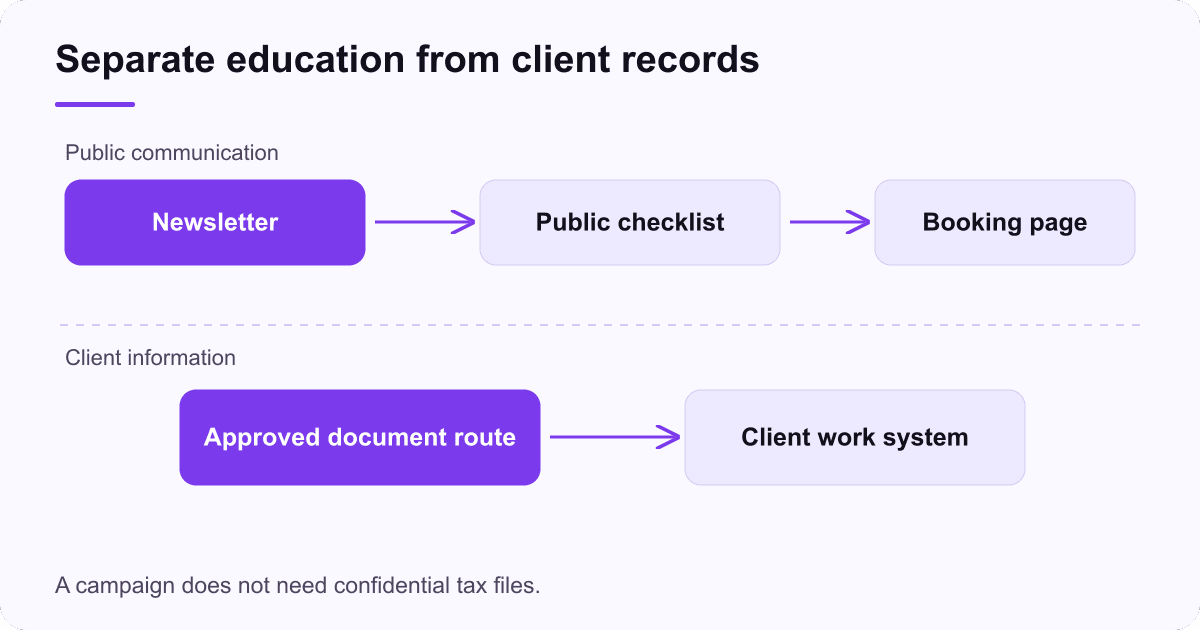
Marketing systems and client-work systems should have defined purposes. Before connecting them, decide what information each needs and who can access it. A newsletter can be organized around broad interests without copying tax returns, account balances or identity documents into campaign fields.
The IRS guidance on protecting client information emphasizes written information-security planning for tax professionals. Treat campaign integrations and document requests as part of the firm's data-handling review, rather than a separate marketing convenience.
Use the firm's approved document route in messages that request records. Explain what the recipient should do if the link appears unexpected or does not work. Avoid asking people to send sensitive files to an unfamiliar address simply because the campaign tool uses it as the reply-to.
Test templates with fictional client details. Check merge fields, recipients, attachments and links. A test should include missing information so the team can see how the message behaves when a record is incomplete. A broken greeting is inconvenient; a wrong attachment can be far more serious.
Assign a person to review replies. If a subscriber sends confidential information to the marketing inbox, the team needs a defined handling process. Do not let that inbox become an unmanaged archive outside the firm's normal controls.
Build three campaigns around different decisions
A welcome message should confirm what the person subscribed to and point toward one useful resource. Keep the first email short enough that the reader can understand the relationship immediately. Introduce the firm in terms of the questions it helps answer, not a long catalogue of every service.
A preparation campaign helps an existing or prospective client get ready for a defined meeting. Explain the purpose, the information to gather and the approved way to provide it. The message should reduce uncertainty for both the client and the staff member receiving the enquiry.
A service-introduction campaign can describe a specific problem the firm handles. For example, a monthly reporting service might suit an owner who receives records but struggles to understand cash movement. Explain the first assessment and what it requires, without implying that a dashboard alone solves the business's finances.
Campaign | Reader's decision | Appropriate next step |
|---|---|---|
Welcome | Is this information useful to me? | Read one introductory resource |
Meeting preparation | What should I gather? | Use the current preparation checklist |
Service introduction | Is this relevant to my business? | Request a scoped discussion |
The types-of-email guide can help organize the broader program. Select formats because they serve different decisions, not because a calendar needs another send.
Write messages a busy owner can use
Put the reason for the email in the opening lines. If you need the reader to prepare something, say what and why. If the message introduces a service, explain whom it suits and what happens after the reader responds. Avoid vague calls to “transform your finances.”
Use a subject that reflects the content. An invented urgency claim may win attention while weakening trust. If a real deadline matters, verify it and explain which people it applies to. A broad audience should not be made to think every date applies to every business.
Give the main action a descriptive label. “See the meeting checklist” is clearer than “Learn more.” Make sure the destination page uses the same terminology and contains the current instructions. A campaign can fail after the click if the page asks for information the email never mentioned.
Keep layout simple. Use readable text, short sections and an image only when it explains something. Do not make essential instructions available solely inside a graphic. Test the email on a phone and check that the action and reply route are easy to find.
For U.S. commercial messages, the FTC's CAN-SPAM guidance covers sender identity and opt-out obligations. Apply it alongside relevant professional and platform requirements; the content still needs to be appropriate for the relationship.
Measure the work the campaign creates
Pick a useful outcome before sending. For a preparation email, you might measure completed checklists or fewer missing-document questions. For a service introduction, count relevant enquiries and completed consultations. Record staff time as well as activity so the report reflects the firm's capacity.
Suppose an illustrative campaign reaches 300 subscribers, generates 12 relevant enquiries and leads to five completed consultations. The enquiry rate is 12 divided by 300, or 4%. Consultations represent five divided by 300, about 1.7%. Those numbers describe the invented example, not an accounting-industry benchmark.
Track what happens after the consultation separately. A booked meeting is not a signed engagement, and a signed engagement is not collected revenue. If the sales cycle extends beyond the reporting period, keep the opportunity open with a next action rather than forcing it into a win or loss.
The campaign metrics guide explains why opens are an imperfect basis for evaluation. Use replies and completed actions where they match the campaign's job, and retain the denominator used for each rate.
Read the questions people ask. If several owners misunderstand the service scope, revise the explanation before increasing frequency. If the enquiries fit but consultations are delayed, the constraint may be scheduling rather than copy.
Keep the calendar tied to review capacity
Choose a cadence the firm can support with current content and timely responses. A short monthly newsletter may be more useful than a weekly schedule that staff cannot review properly. Frequency should follow the audience's needs and the firm's ability to deliver, not a universal rule.
Maintain a simple campaign calendar with the topic, audience, content owner, technical reviewer, destination and send date. Add a review point for recurring material before it is reused. A message about recordkeeping may remain useful longer than one about a changing filing requirement.
Start with one approved campaign and inspect the full journey: subscription, email, destination, reply and follow-up. Resolve broken links or unclear handoffs before adding automation. Save the final version and the result so the next campaign can build on what the team learned.
The aim is a dependable communication habit that helps readers work with the firm. Give each message a clear purpose, protect the information entrusted to you and judge success by useful client actions. That creates a stronger program than a large list receiving repeated reminders with no defined next step.