
Email Marketing for Medical Practices: A Practical Workflow
A medical practice's email program should help a defined audience take a useful next step without exposing patient information or creating confusion about care. Keep public newsletters, administrative messages and individual clinical communication in separate workflows. Decide who approves the audience, content and sending system before drafting the first campaign.
This guide concerns a practice communicating about its own services and educational material. It is not a guide to buying patient lists or using business-contact data as patient information.
Separate communication by purpose before choosing software
Begin with the message's purpose. A public newsletter explaining how to prepare for a first visit differs from an appointment reminder, a response to a patient's question or a promotion involving another organization. Those messages should not automatically use the same audience selection or approval process.
Create a communication map with the practice manager, clinical lead and person responsible for privacy. Record who receives each type of message, where the addresses come from, which system sends it and who handles replies. This makes the current workflow visible before automation increases its reach.
For HIPAA-covered entities, using protected health information for marketing can require authorization, subject to defined exceptions. HHS's marketing guidance distinguishes marketing from certain treatment and health-care operations communications. Have the appropriate privacy or legal reviewer classify the actual proposed use; a newsletter label does not settle that question.
Do not let a general newsletter subscription become a substitute for every permission the practice may need. Equally, do not assume that opting out of a newsletter means a patient has declined all necessary administrative communication. Keep the purposes and preferences distinct and have the practice's responsible team define the rules.
The opt-in email guide covers ordinary subscription management. Apply it within the practice's privacy and communication requirements, rather than treating it as a complete health-information policy.
Collect only the information the newsletter needs
For a general public newsletter, a simple signup can ask for an email address and clearly describe the content and expected frequency. Additional fields should serve an actual purpose. A marketing form rarely needs a detailed medical history or a description of symptoms.
Show the subscription choice where it is made. Explain the kind of messages the person will receive and how to stop them. Keep a record of the signup source and preference so staff can answer a later question about why a message arrived.
Avoid building promotional segments from diagnoses, appointment notes or treatment history without the required assessment and authorization. Even a segment name can reveal sensitive information if it appears in an export or an internal notification. Use the practice's approved data-handling process and involve the privacy lead before connecting systems.
A business directory of medical practices contains organization records, not a patient audience. It may be relevant to researching professional organizations, but it cannot supply consent or clinical context for a patient campaign. The practice-records versus physician-contacts guide explains that distinction.
Review forms and exports from the recipient's perspective. Check the confirmation message, preference link and staff notification. If a free-text field invites health details, decide whether it belongs in that workflow and how submissions are handled before making it public.
Choose topics that reduce a real point of confusion
Ask reception and clinical staff which general questions recur. Good newsletter topics can explain the practice's process: what information to bring, how to request records through the approved route, where to find current opening information or how to prepare administrative details for a visit.
Choose one question per message. A short explanation with a clear destination is easier to review than a large newsletter mixing practice news, health claims, third-party promotions and appointment instructions. Link to the current page that contains the complete approved information.
Have a qualified clinical reviewer assess any clinical educational content. Record the source, review date and intended audience. Avoid turning general education into a diagnosis, personalized recommendation or promise of an outcome. If the topic needs individual assessment, direct the reader to the appropriate clinical channel.
An illustrative message could have the subject “What to bring to your first appointment” and explain where to find the practice's preparation checklist. It might end with “For questions about your booking, use the contact route on your confirmation.” The exact instructions must reflect the practice's real process.
For remote-care information, use the telemedicine communication guide as related reading, then verify the practice's actual service, eligibility and booking arrangements. Do not imply that every concern can be handled remotely merely because the practice offers some virtual appointments.
Give every campaign a documented approval path
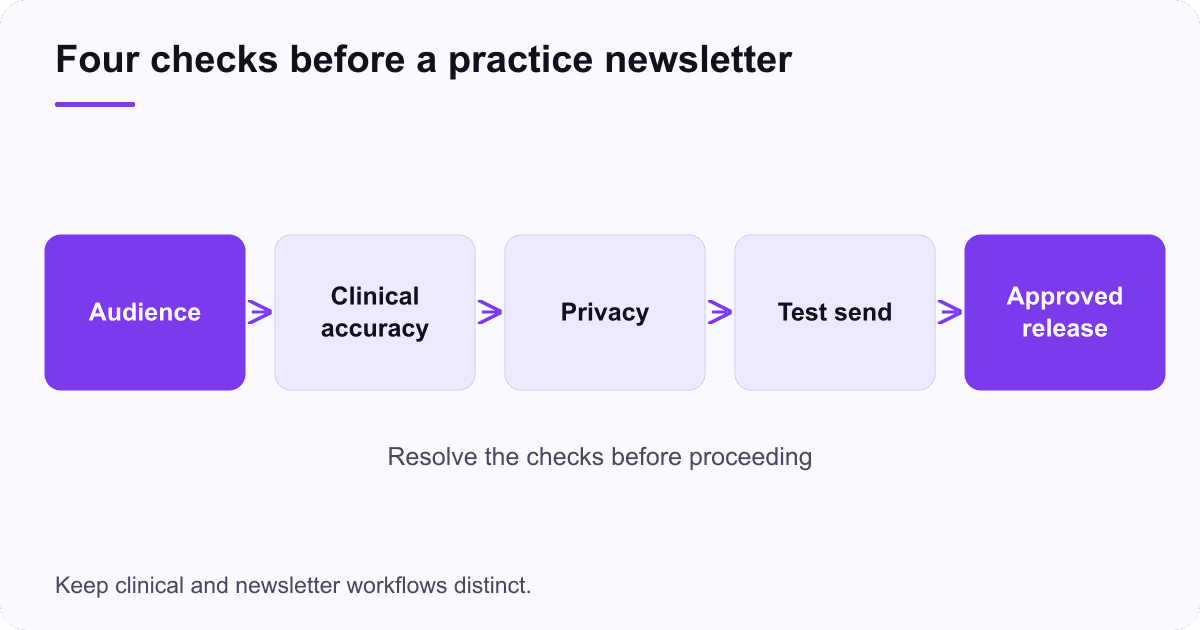
Assign four decisions: whether the audience may receive the message, whether the content is accurate, whether the data handling is appropriate and whether the message works as intended. One person may perform more than one role in a small practice, but the checks should still be explicit.
Use a compact campaign record. Save the final copy, destination page, audience rule, approving people and planned send date. If the underlying page changes before sending, check that the email still makes sense. A campaign approved against an old booking process may become confusing even though its prose remains unchanged.
Test using fictional information. Inspect the subject, preview text, greeting, images, links and preference controls on a narrow screen. Confirm that a missing name produces an ordinary greeting rather than a broken template. Keep sensitive details out of subject lines and preview text.
HHS permits some treatment-related email communication with appropriate safeguards; its email FAQ does not make every marketing platform suitable for patient information. Assess the actual workflow, vendor arrangements and security requirements before using it.
Make the reply route safe and manageable
Decide where replies go and who monitors them. A general newsletter can prompt clinical questions even when it does not request them. Staff need an approved process for routing those questions and handling sensitive information that arrives unexpectedly.
Tell readers what the reply channel is for. If it is not monitored for urgent or clinical matters, use the practice's approved wording and direct readers to the correct channel. Do not invent an emergency instruction or a response-time promise simply to fill the footer.
Give the team capacity to answer ordinary questions after a send. If a message announces a new booking arrangement, reception should know the details and have the same current information as the email. Otherwise the campaign creates work without improving the patient experience.
Keep appointment management in the appropriate system. A promotional email tool should not become a parallel clinical record or an improvised way to collect medical histories. When a reader needs individual assistance, move the conversation through the approved process.
Review the questions generated by each campaign. Several replies asking the same administrative question may reveal an unclear sentence or destination page. Use that evidence to improve the explanation before sending a larger audience the same material.
Measure useful actions without building an unnecessary patient profile
Choose a narrow campaign goal before sending. For a general preparation newsletter, the goal may be that readers find the approved checklist and ask fewer basic process questions. For a public event announcement, it may be completed registrations through the approved route. Define what can be measured appropriately in that context.
Use aggregate reporting where it answers the question. Avoid collecting more individual behavior than the campaign needs, especially when links or page names could reveal health interests. Have the responsible team review tracking arrangements rather than assuming standard marketing settings are suitable.
Consider an illustrative public newsletter sent to 400 subscribers, with 20 recorded unique clicks to a general preparation page. The observed click rate is 20 divided by 400, or 5%, if the denominator is the chosen sent-message population. It does not establish that 20 patients attended, understood the instructions or benefited clinically.
If the practice records eight general enquiries after the message, assess what they concern and how they were handled. Do not automatically attribute every booking in the following week to the campaign. Keep the time window and attribution method clear.
The email measurement guide explains denominators and the limits of opens. Use those distinctions to avoid turning a marketing report into an unsupported claim about patient outcomes.
Begin with one approved message and improve the process
Start with a topic the practice can explain accurately and a clearly permitted audience. Build the message around one helpful action, test the actual destination and ensure staff can respond. A small, well-managed send reveals process problems before automation repeats them.
Afterward, review delivery issues, opt-outs, questions and completion of the intended action. Separate content problems from workflow problems. A broken booking link calls for a technical correction; repeated questions about eligibility call for clearer information; unexpected sensitive replies call for a review of the contact route.
Maintain the content. Opening hours, clinicians, booking arrangements and service details change. Assign an owner to review recurring messages before they are reused. A current send date should not disguise outdated information inside an automated sequence.
Expand only when the practice can explain how the next audience, topic and data use fit the approved process. Email can support a useful relationship with the public and patients, but its value comes from clear information and dependable handling. The first deliverable is a message the practice can stand behind, with a safe route for whatever the reader does next.