
How to Communicate Telemedicine Services Clearly
Communicate telemedicine services by explaining who can ask about them, how the practice determines whether a remote appointment is appropriate, what preparation is required and where patients can get help. Clear instructions are more useful than a broad promise of care from anywhere. Keep promotional messages, administrative reminders and clinical information in the channels your practice has approved for each purpose.
This guide concerns service communication and appointment administration. It does not recommend treatment, determine clinical suitability or provide a universal rule about telehealth coverage.
Define the actual service before promoting it
Write a service description with the clinical and administrative team. Identify the appointment types the practice offers remotely, who reviews suitability, the locations it can serve and the route for asking questions. Do not let a marketing page promise a broader service than staff can provide.
Avoid absolute claims such as “see a doctor anywhere” or “replace every office visit.” Remote services have practical and regulatory boundaries, and the appropriate form of care depends on the circumstances. The communication should explain how the practice assesses a request rather than asking a general advertising form to make that decision.
Location deserves particular attention. HHS guidance on cross-state licensing, updated April 30, 2025 and reviewed here on September 23, 2026, explains that rules vary by state and advises providers to verify patient location and obtain consent before appointments. The practice should confirm the requirements that apply to its professionals and services.
Describe cost and coverage through the practice's current verification process. Do not publish a blanket promise that every payer covers every remote appointment. Give patients a clear route to ask about the expected charge and any information needed before booking, with a responsible team member maintaining the answer.
Separate promotion, administration and clinical communication
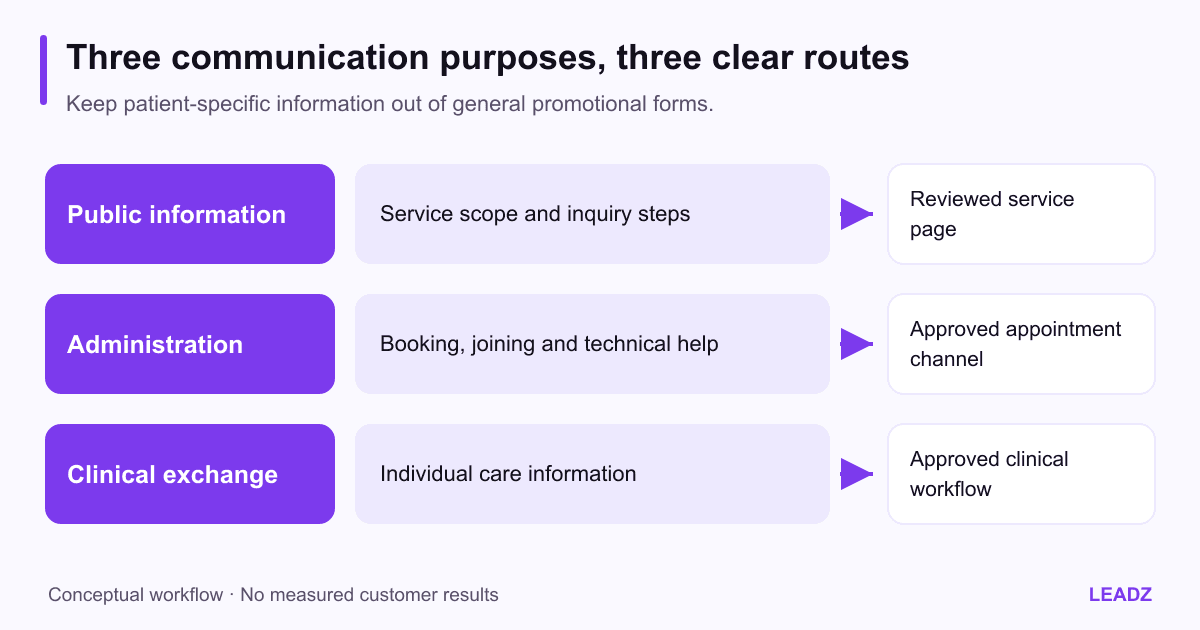
Public service information explains what the practice offers and how to inquire. Administrative communication handles appointment details and practical instructions. Clinical communication concerns the patient's individual care. These purposes may involve different systems, staff responsibilities and permissions. Keep that distinction visible in the workflow.
Do not use a general email-marketing form to collect symptom histories simply because the form is easy to build. Let the clinical and privacy teams define where patient-specific information belongs and how staff should handle it. A promotional campaign is not an appropriate substitute for an approved intake process.
The HHS marketing guidance addresses the use and disclosure of protected health information for marketing. Have the practice assess a proposed campaign under the rules that apply to it. An existing relationship with a patient does not make every new use of their information automatically appropriate.
Keep business prospecting separate too. A directory of medical practice businesses helps suppliers discover organizations; it is not a patient audience for telemedicine promotion. The medical-practice data guide explains why business records, professionals and patients should never be treated as interchangeable contact lists.
Build a service page that answers the booking questions
Organize the page around a prospective patient's next decisions. Explain the service in plain language, the request process, what happens after a request and where to ask for assistance. State when the page was reviewed and assign responsibility for keeping operational details current.
Avoid forcing patients to infer eligibility from a list of broad benefits. A clear sentence such as “Contact the practice to confirm whether this appointment type is appropriate for a remote visit” can direct the next step without making a clinical decision on the page. The clinical team should approve the exact wording for the service.
Include practical information such as the expected appointment format, whether a device or account is needed and how to request accessibility or language support. Confirm the practice can actually provide the assistance described. Do not promise an accommodation merely because a platform advertises a feature.
Make the action specific: request an appointment, check an existing booking or contact the office about technical help. A single button labeled “start now” can be misleading if staff must review the request first. The page should match the real process from inquiry through confirmation.
Prepare patients with short, usable instructions
HHS patient preparation guidance, updated July 29, 2025, highlights practical preparation such as checking visit details, testing technology, asking for support and choosing a suitable private setting. Use it as a reference while tailoring instructions to the system and support process your practice actually uses.
Send the information at a time and through a channel consistent with the practice's approved communication process. Include the appointment date and time zone, the correct joining route, any approved preparation steps and a contact for technical difficulties. Keep the message short enough that the essential instructions are easy to find.
Test the instructions with someone unfamiliar with the platform. Can they identify the link, understand whether an account is required and find help when the camera or sound does not work? A staff member who uses the system daily may overlook steps that are confusing to a new patient.
Avoid placing sensitive details in a subject line or ordinary promotional message. Link or direct patients to the approved route when individual information is needed. The medical email communication guide provides a broader framework for keeping purpose and audience clear.
Check the instructions on a small screen and with enlarged text. The joining route, time and help contact should remain easy to find without relying on a decorative image. Put essential information in readable text so the message still works when images are blocked.
Plan the exception routes before launch
A complete communication plan explains what happens when the ordinary sequence fails. The patient may be in a different location, unable to use the technology, uncertain about charges or unable to attend. Assign a responsible route for each administrative issue so staff do not improvise answers in a marketing inbox.
Clinical concerns and urgent situations require the practice's professionally approved instructions. Marketing staff should not create symptom-based triage rules or promise that a promotional inbox is monitored for urgent care. Make the relevant service limitations and approved help routes clear in the appropriate patient-facing materials.
Use an administrative rehearsal. In a fictional example, a patient receives a reminder but cannot open the joining link. The message directs them to the practice's support number. Staff verify the appointment through the approved process and follow the established alternative. The rehearsal checks communication and responsibility, not clinical outcomes.
Where care involves another practice, keep the professional handoff separate from the public campaign. The dental referral network guide offers an example of administrative statuses such as sent, received and next step arranged. The same distinction can help a team avoid calling a handoff complete when only a message has been sent, while clinical procedures remain specialty-specific.
Measure communication quality with appropriate denominators
Choose measures related to the communication task: completion of the booking instructions, requests for technical help, incorrect joining links or administrative cancellations caused by unclear information. Define each event and use an observation period long enough to reveal recurring problems without claiming a universal benchmark.
Suppose a fictional practice sends approved instructions for 40 scheduled remote appointments for 40 different patients. Six patients ask for help finding the link, two need clarification about time zones and four require other assistance. These categories may overlap, so the total number of unique patients needing help cannot be calculated by adding the categories unless the records are reconciled.
If eight unique patients needed help with instructions, that is 20% of the 40 scheduled appointments. The figure describes this hypothetical administrative cohort. It does not measure clinical effectiveness, patient satisfaction or the quality of care. Use the notes to identify which instructions need improvement.
The campaign metrics guide explains why opens and clicks are limited signals. For telemedicine communication, a clicked link does not prove that the patient understood the preparation or completed an appointment. Keep communication activity, administrative completion and clinical evaluation as separate measures.
Assign ownership for every public promise
Maintain a content register listing the service page, reminders, help instructions and any promotional messages. For each, identify the owner, approver, review date and events that trigger an update. A change in platform, hours, available appointment types or service geography should lead to a targeted review.
Preserve the difference between original publication and substantive revision. Updating a date without checking the instructions does not make them current. Review the real joining process and support route, then record what changed. That is especially important when messages are reused automatically for months.
Ask staff which questions patients repeatedly raise. A recurring confusion about time zones, device setup or the request process is evidence for a clearer explanation. Revise the relevant section and observe whether the problem changes. Avoid rebuilding the whole campaign when one missing instruction is the actual issue.
Begin with a clear service page and one tested instruction sequence. Confirm eligibility wording, support ownership and the appropriate channels for individual information. Telemedicine communication works best when it helps people understand a real service and complete the next administrative step, without making promises the practice has not approved or cannot reliably fulfill.