
Roofing Contractor Prospecting: From Territory to Shortlist
A roofing-contractor prospect list should identify businesses that fit your offer, fall within your operating territory and have a sensible route for further research. It should not imply that every roofing business is currently buying. For suppliers and agencies, the useful deliverable is an evidence-backed shortlist with clear next questions.
This workflow is for selling to roofing businesses. Contractors looking for property owners with roofing projects should use the separate construction lead-generation guide.
Write a territory and service brief
Define the product or service first. A supplier of commercial roofing materials needs different prospects from an agency offering residential lead-generation services. Identify the relevant work type, delivery or service radius, order constraints and exclusions before searching.
For a hypothetical Texas supplier, the brief might cover commercial roofing businesses within established delivery routes. Texas is the reporting territory, but the routes define actual serviceability. A company located elsewhere in the state does not qualify merely because its address matches the state filter.
Record the evidence required for inclusion. A website describing commercial roofing can support trade fit. Published service areas can support geographic research. Purchasing volume, current supplier arrangements and project timing usually need direct confirmation. Keep those as questions rather than filling them with optimistic assumptions.
Use Texas roofing business records or the national roofing category to start discovery. Apply the location and contact filters appropriate to the task, then inspect examples. The contractor data buying checklist helps determine whether the segment contains the kind of businesses your offer can serve.
Treat the historical count as research context
The Texas roofing snapshot saved March 12, 2026 contains 7,204 business records, of which 1,651 have a stored primary-email value. It was retrieved September 6, 2026, and its embedded aggregate update timestamp is December 14, 2025. These dates do not establish when each business or mailbox was last checked.
The 1,651 figure describes historical primary-email availability. It is not a count of verified individual recipients, unique companies or qualified buyers. Multiple locations can belong to one organization, and several records may share a central contact route. Your actual segment needs record-level review.
Keep these historical numbers separate from your current cohort. If a new search produces a different total, record the current filters and date. Do not assume the difference measures growth or decline without checking whether the definitions and collection methods are comparable.
The multi-state territory guide shows how inventory can inform a workload allocation. The purpose is to decide how much research to undertake, not to convert a directory total into a sales forecast. A manageable, reviewed group is more useful than a large unexamined number.
Review the website for trade and project fit
Read the contractor's services and project pages. Distinguish residential repair, commercial installation, maintenance and adjacent exterior work where those differences matter to your offer. Record the page supporting the classification and the date checked. A roofing category can include business models that need very different suppliers.
Do not infer current project demand from a gallery photograph. A completed project can show experience, but it may be old or outside the contractor's present focus. Similarly, a storm-related post does not establish a new purchasing opportunity or justify claims about damage at particular properties.
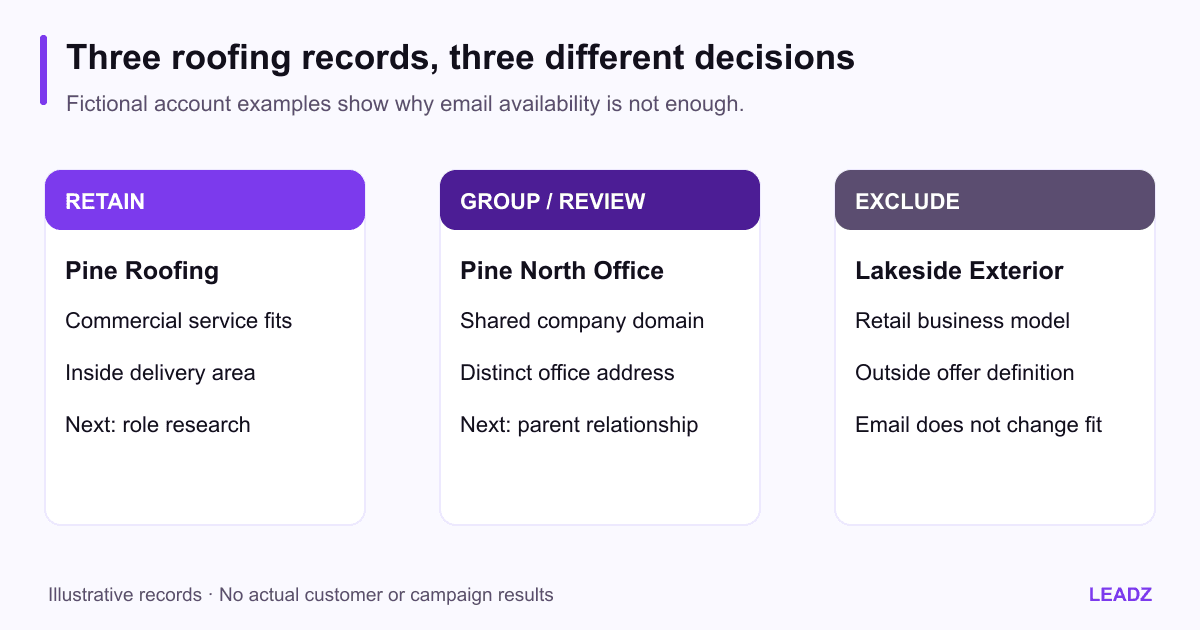
Use three fictional records to calibrate the team. Pine Roofing describes relevant commercial work within the delivery area, so it remains for role research. Pine Roofing North shares the domain and central phone but has a different address, so its account relationship needs review. Lakeside Exterior Retail sells products but does not perform the work your offer serves, so it is excluded despite having an email address.
Where a licensing check is relevant, consult the appropriate authority for the trade and jurisdiction. California's CSLB contractor guidance illustrates a state-specific verification route; do not apply its requirements universally. A directory listing does not itself establish licensing status.
Resolve the account before resolving the contact
Decide whether the opportunity belongs to a company, a branch or a local operating team. A central materials agreement and a branch-level service visit may require different records. Confirm the relationship before assigning multiple sales owners to what may be the same buyer.
Use domain, address and phone evidence together. A shared website can indicate related locations, but it is not an automatic merge instruction. Preserve legitimate branches and the source rows supporting them. The deduplication guide provides a method for reviewing those matches without deleting useful location detail.
Then research the contact route. A published office email may be suitable for a routing question, while a named estimator or project manager may handle a different subject. An available role is not necessarily purchasing authority. Ask who evaluates the particular material, service or agency engagement you offer.
Leadz exports can include available person names and roles associated with saved email profiles. Keep those associations intact and treat missing fields as unresolved research. The CSV field guide explains how business and people information appear in the export. Do not promise a direct owner contact where the evidence only supports a general business route.
Reconcile a small cohort with explicit decisions
Choose a review batch your team can finish. For a hypothetical 50-row cohort, suppose ten rows fall outside the delivery area, eight fail the trade definition, five repeat an account already represented and seven need further research. Twenty remain ready for an appropriate first inquiry. The dispositions sum to 50.
These figures illustrate the process; they are not measured Leadz results or expected roofing-market conversion rates. Keep one primary disposition per row so a record excluded for both geography and trade is not subtracted twice. Secondary issues can remain in notes.
For every retained account, record the reason for inclusion, supporting source, contact route, role evidence and next question. For every unresolved account, name the missing evidence. “Need to confirm central purchasing” is actionable. “Maybe good” is not.
Review a few excluded records with another teammate before finalizing the cohort. If the exclusions reveal disagreement about what counts as commercial roofing or which counties are serviceable, correct the rule and revisit affected rows. Consistency matters more than finishing the first pass quickly.
Use the qualification worksheet to keep fit, role evidence and demonstrated interest separate. A high fit score cannot override suppression, existing account ownership or a clear indication that the business is outside the offer's scope.
Make the inquiry about a concrete business subject
Build the message from the research note. A fictional material supplier might say: “Your service page describes commercial roof maintenance in the counties we deliver to. We supply a defined range of maintenance materials and would like to confirm who handles supplier evaluations.” The message should specify the real product range and route rather than making a vague promise of better margins.
For an agency, the relevant observation and role may differ. A website service could ask who maintains location and service information. It should not claim that a contractor loses a precise number of projects because of a visible design issue. Observable evidence supports a conversation; it does not prove an internal financial problem.
Follow the contractor's stated business-inquiry process and respect channel requirements and contact preferences. Do not present yourself as a homeowner with a job in order to obtain a sales conversation. Keep the commercial purpose clear from the beginning.
The B2B outreach sequence can help plan a limited follow-up. Record the response and update the next step. A referral to a purchasing colleague, a request for specifications and a rejection each require a different action; they should not all become an undifferentiated reply metric.
Hand over the shortlist with capacity and cost in view
Estimate the work behind the ready accounts. If the hypothetical 50-row review takes five hours at an internal planning cost of $32 per hour, research costs $160. With 20 retained accounts, that is $8 per account before data access, outreach and meetings. Replace these illustrative assumptions with your observed time and costs.
Check that the sales and delivery teams can handle the next stage. A supplier should not invite inquiries from businesses outside a workable route simply to increase the number of conversations. An agency should not expand the shortlist beyond its ability to prepare relevant proposals.
At handoff, include account identity, locations, fit rationale, evidence date, contact route, owner and next action. Reconcile existing customers, active opportunities and suppression immediately before outreach. A clean handoff should let another colleague proceed without repeating all the research or guessing why an account was selected.
Review the first cohort before buying or researching another large segment. If trade mismatch dominates, refine the category and evidence rules. If parent relationships dominate the unresolved queue, improve account grouping. If suitable businesses consistently lack a clear route, budget role research explicitly. The shortlist improves when those specific problems are addressed, not when more rows are added to the same process.