
Deduplicate and Suppress Business Contacts Before a CRM Import
Before importing business contacts, decide whether each row represents a company, a location or a person. Then review possible duplicates, preserve legitimate relationships and apply suppression rules independently. Removing repeated email addresses alone can erase useful branches while leaving duplicate companies behind.
Keep the original file unchanged. Work from a copy and record every merge, exclusion and unresolved match. The fictional deduplication worksheet provides examples to practice on before changing a real CRM.
Define the objects your CRM should preserve
A business directory often lists locations. A CRM may organize companies, contacts, deals and activities. Those models overlap, but they are not identical. Decide how a second office should appear before asking a spreadsheet or import tool to remove duplicates.
Consider fictional Harbor Roofing North and Harbor Roofing South. They share a website and central inbox but have separate addresses. If your team sells one company-wide software agreement, they may belong under one account with two locations. If delivery is managed locally, each branch may need its own operational record. Both structures can be reasonable when the relationship is documented.
People introduce another layer. One person may work across several locations, and a general inbox may be used by several people. Neither situation fits a rule that treats every email as one unique business. Keep the organization, location and contact identities separate, even if your first working sheet stores them in adjacent columns.
Write a brief import policy: the object being created, its identifier, how branches are represented and who resolves uncertain relationships. The business database guide explains how that policy fits a larger research and maintenance process. A few explicit decisions now prevent a different interpretation on every later import.
Normalize comparison values without rewriting history
Create helper columns for comparisons while preserving original values. A normalized domain can remove obvious formatting differences such as a scheme or trailing slash. A comparison name can standardize spacing. A phone comparison can use a consistent country-aware format when the country is known. These helpers assist review; they should not silently replace the source record.
Be conservative with email addresses. Remove accidental surrounding whitespace, but do not guess that punctuation or a suffix can be discarded. Mail systems can interpret addresses differently. If your matching process uses a case-normalized comparison value, retain the original address and document that choice rather than assuming the normalized version is universally safe for sending.
Addresses also need context. Suite numbers can distinguish legitimate offices. “North” can be part of a street name or a location label. Aggressively stripping those values may create false matches. Keep the country and postal code as text where appropriate so spreadsheet conversion does not remove meaningful formatting.
Never match two records merely because both have a blank domain, email or phone. Missing information means there is no evidence in that field. It is not positive evidence that the records refer to the same entity. Put incomplete matches into a review queue instead of making the absence look like agreement.
Use match tiers and a deliberate surviving-record rule
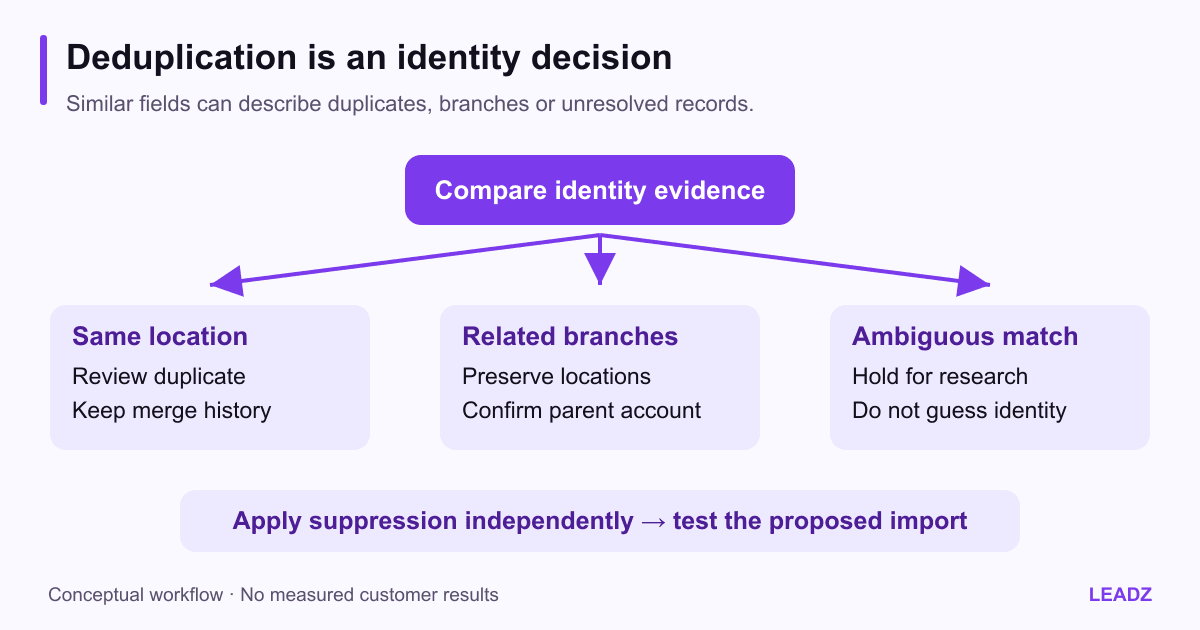
A strong duplicate candidate might have compatible business identity, the same confirmed location and matching domain or contact evidence. A possible parent-and-branch relationship might share a domain while retaining different addresses. A similar name with conflicting details is ambiguous. These cases deserve different actions.
Candidate | Example evidence | Recommended disposition |
|---|---|---|
Same location repeated | Matching address and compatible identity | Review, merge and preserve source references |
Related locations | Shared domain, distinct offices | Group under a confirmed parent if appropriate |
Shared contact service | Same phone, unrelated brands | Investigate; do not merge by phone alone |
Uncertain identity | Similar name, missing or conflicting fields | Hold for manual review |
Choose a surviving-record rule before merging. An existing CRM account with an owner and activity history usually deserves explicit review before replacement. New source data may add a missing website but should not automatically overwrite a manually confirmed account name, relationship status or responsibility assignment.
For every accepted merge, retain the surviving identifier, merged source identifiers, reviewer, date and reason. Preserve useful nonconflicting fields through a documented mapping. If two sources disagree about an address or role, keep the conflict visible until it is resolved; selecting the newest file does not prove every value inside it is newer.
The goal is a trustworthy relationship model, not the smallest possible row count. A file that shrinks dramatically may reflect good duplicate removal, or it may mean valid branches were deleted. Review examples from each match tier to distinguish those outcomes.
Apply suppression without deleting the evidence
Deduplication asks whether two records describe the same object. Suppression asks whether a record should be excluded from a particular use. A unique, accurate business record can still be suppressed. A duplicate merge must not erase an opt-out or another restriction associated with the contact route.
Maintain suppression in the system designated to enforce it, with an appropriate reason, date and scope. Reconcile new imports against that source before outreach. A changed business spelling or a refreshed export must not make a previously excluded address appear eligible again.
Shared inboxes need particular care. If several branches use the same central address, an objection at that route affects how the team treats the shared channel. Do not use another spelling, a different branch row or a newly found address as a way to evade the objection. Route uncertain cases to the person responsible for the organization's contact policy.
Keep only the information needed to match and enforce restrictions in the appropriate controlled system. This guide does not prescribe a universal retention period or legal basis. Those choices depend on the actual data, use and applicable requirements. The operational point is that removing a contact from an active list must not destroy the evidence needed to prevent accidental reintroduction.
Reconcile rows with mutually exclusive outcomes
Give every source row one final import disposition. You can keep several issue flags, but the primary disposition should make the total reconcile. This avoids a report that subtracts the same row once for duplication and again for suppression.
Consider an illustrative 100-row file. Review assigns eight rows to confirmed duplicate removal, six to suppression, seven to an unresolved queue and 79 to the proposed import. The reconciliation is 8 + 6 + 7 + 79 = 100. If some duplicate rows also match suppression, preserve that additional flag without counting them twice in the disposition totals.
The 79 proposed rows might represent 72 company accounts because seven are legitimate additional locations. Report both counts if the distinction matters. Neither number is a conversion metric; they describe the structure of the prepared data. Keep a separate count of people or contact routes rather than implying every location introduces a new recipient.
Review the contact sample evaluation process if you need to estimate cleanup effort before buying a larger segment. The unresolved queue should be part of the working-cost calculation, not hidden outside it.
Test the destination's real import behavior
Check the destination's current documentation rather than assuming all CRMs use the same identifiers or blank-cell behavior. For example, HubSpot's import guidance, updated September 11, 2026, explains property headers, identifiers for updates and that blank imported cells do not clear existing property values. Confirm the behavior relevant to your objects and account configuration.
Build a small test batch with deliberately varied cases: a new company, an existing company update, a second branch, an additional contact, a blank field and a record that should remain suppressed. Use fictional or otherwise appropriate test records in a controlled environment where possible. Check the resulting relationships as well as the import's success message.
Map Leadz's actual headers using the CSV field dictionary. Available names and roles can be associated with particular email profiles; preserve those associations. Do not map a multi-person cell into one contact's job title or attach every profile to every email. Keep detailed profile data separately if the destination cannot represent it safely.
After the test, inspect created records, changed fields, owners, rejected rows and any automations triggered by import. A technically accepted file can still create an operational problem if it enrolls contacts into a sequence or changes account ownership unexpectedly. Confirm those consequences before proceeding with the larger batch.
Make the second import safer than the first
Retain the original file, prepared file, mapping, disposition log and import result together. Name them with a date and cohort identifier. Record which identifiers the destination assigned so a later update can target existing records instead of recreating them from names alone.
Create a short repeat-run checklist from the problems found in the test. It might include checking a known shared inbox, preserving a branch relationship or excluding a manually managed account. Keep the checklist tied to real failure modes; a long generic list that nobody follows offers little protection.
Assign ownership for unresolved records and future corrections. A review queue without an owner becomes a permanent pile of uncertain data. Decide which questions justify further research and which records should remain excluded because the expected value does not support the effort.
The final measure of success is not simply “import completed.” It is that companies, locations and people remain understandable, existing history survives, restrictions continue to apply and another teammate can explain the decisions. That foundation makes future exports and CRM updates much easier to trust.